
Pomodoro timer for iPhone, with a mole who digs
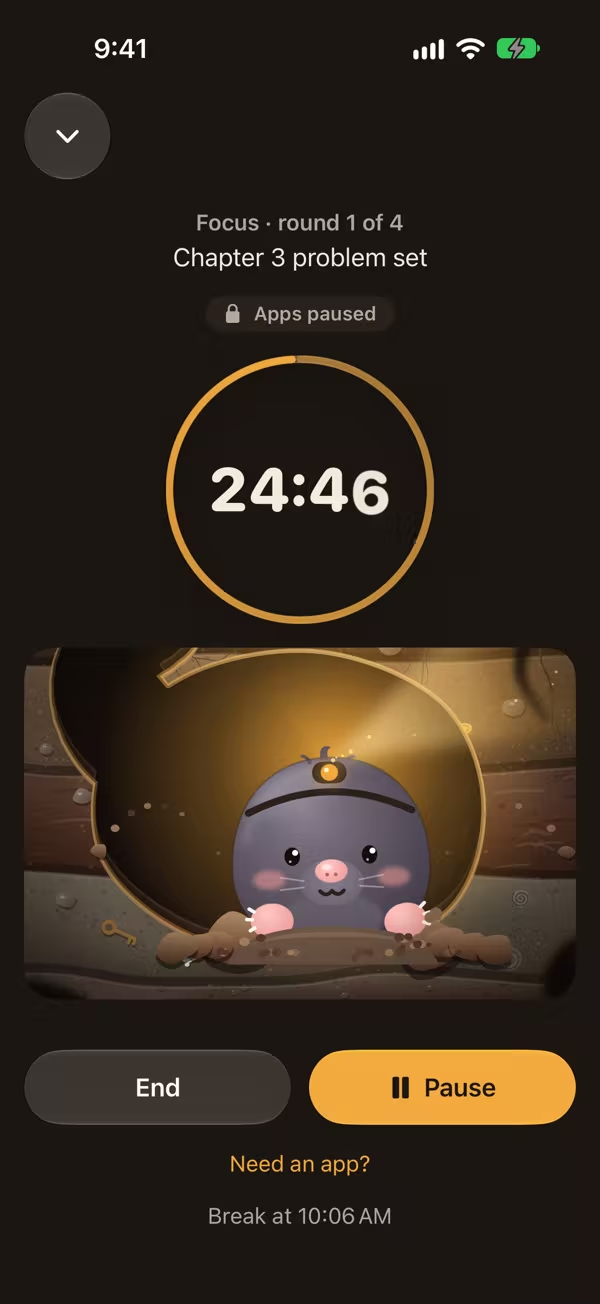
Pick a rhythm, start the session, and let Gaston dig his burrow while you work. The time stays visible without opening the app.
On the App Store soon
See the rhythmsFree, no account, no data collected. iOS 26.5 or later.
The rhythm that fits you
25/5 cycles
The classic pomodoro rhythm: 25 minutes of focus, 5 minutes of break, a longer break after a few cycles. You set the lengths, the cycles and auto-start.
52/17
Longer blocks for problem sets and writing.
Flowtime
No timer cutting you off: you work while it flows, and the break is proportional.
Countdown
One length, one start, that is all.
Three free presets to start fast. Pausing breaks nothing: not your streak, not your burrow. If you stop early, your minutes are kept.
Everywhere, without opening the app
The time left lives on the Lock Screen and in the Dynamic Island, with pause, skip and stop. Start a session from a widget, Control Center, the Action button, or by asking Siri. The time stays right, even after your iPhone restarts.
Gaston digs every minute
Each focused minute digs his burrow a little deeper and unearths finds to collect. Your streak keeps rest days: a day without a session does not break it. Gaston never judges you, he waits for you.
Coming next
Gaston grows up Coming soon
As your hours add up, he goes through four stages, from baby mole to master digger. You will also be able to dress him up and change his room theme.
Ambient sounds and music Coming soon
Rain, café, brown noise, to work in your own bubble. You can also start an Apple Music playlist, or open a Spotify playlist link, when your session begins.
End-of-phase alarm Coming soon
An optional alarm at the end of a focus phase that rings even in silent mode. Without it, you keep the notification.
Breathe with Gaston Coming soon
One minute of guided breathing, with haptics, during your breaks.
Gaston on the Lock Screen and in StandBy Coming soon
His pose changes depending on whether you are working, on a break or in Strict mode.
A shared burrow Coming soon
Dig with friends through iCloud sharing. Only minutes are shared: no chat, no ranking.
Friend challenges Coming soon
A shared goal inside a shared burrow, for example a number of hours each over the week, and a find to share when it is reached. Still no ranking.
Desk key Coming soon
An NFC sticker or a QR code starts a session in one move.
New widgets Coming soon
Medium and large timer, Lock Screen, exam countdown and burrow depth.
Gaston v2 Coming soon
An animated Gaston who digs to the rhythm of your timer, stretches, yawns and falls asleep.
In the works, not in the App Store yet.
Questions
Pomodoro, 52/17 or Flowtime?
Start with 25/5 if starting is hard, 52/17 for long problem sets, Flowtime when you are in the zone.
Does the timer work without Screen Time?
Yes. App blocking is optional, Burrow stays a timer without it.
Pomodoro® is a trademark of its creator. Burrow is not affiliated with it or endorsed by it: the word only describes the method.
Gaston is ready to dig.
Free, no account, for iPhone.
On the App Store soon